
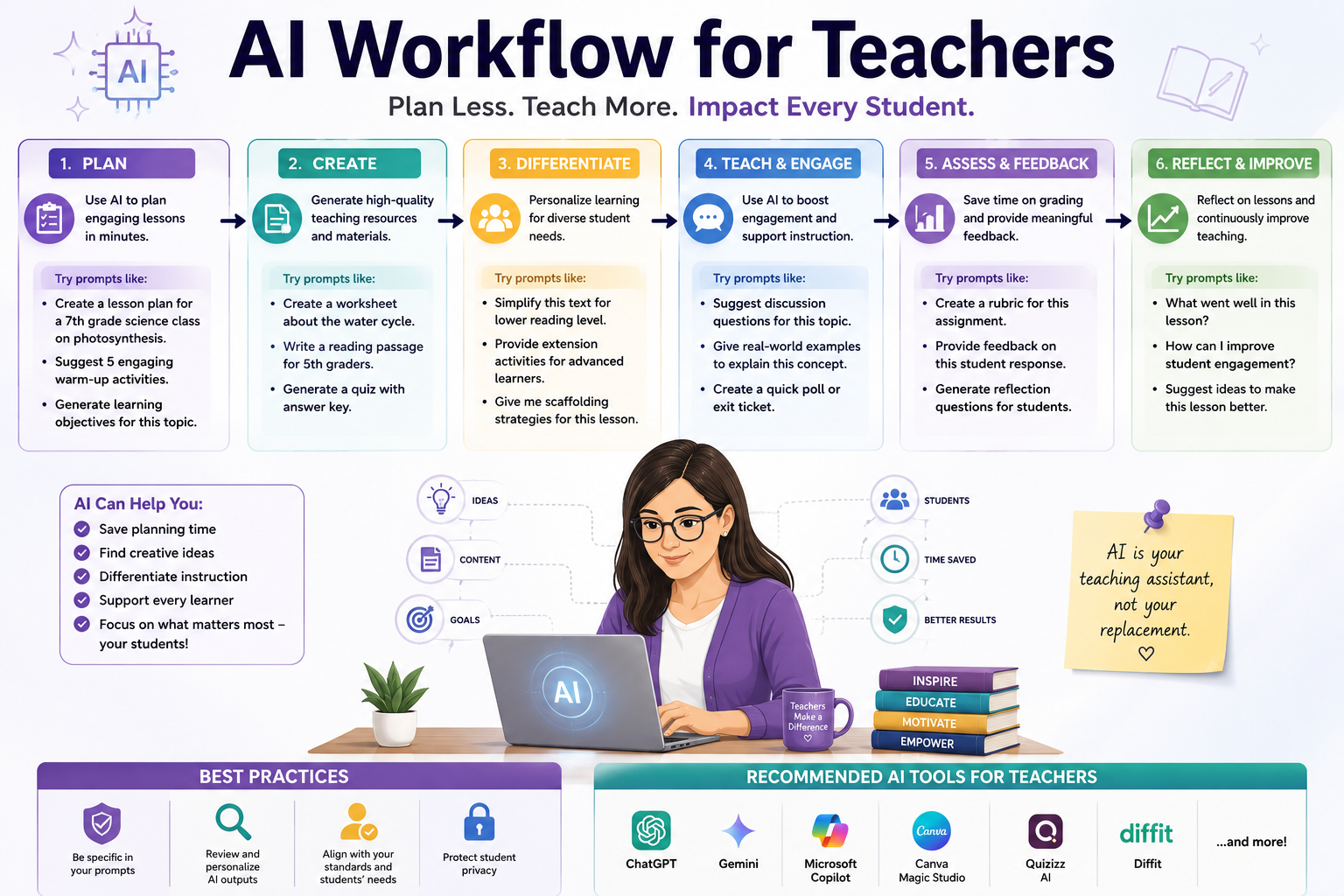
Every teacher I know has the same Sunday-night problem: a blank planner, a pile of standards to cover, and not enough hours. Over the last year I built an ai workflow for teachers that turns that dread into a repeatable, thirty-minute Sunday routine. This isn’t a theory piece, it’s the actual teacher’s weekly planning routine I follow, week after week, with the tools, prompts, and time blocks included. If you want to plan lessons faster without losing your evenings, this is the system.
Quick-Answer Box: What This Workflow Looks Like
| Day | Task | Time Needed | Main Tool |
| Sunday | Weekly plan + lesson drafts | 30-40 min | ChatGPT / Claude |
| Monday | Differentiation pass | 15 min | AI worksheet generator |
| Tuesday | Quiz + rubric creation | 15 min | AI rubric tool |
| Wednesday | Parent + admin emails | 10 min | AI email assistant |
| Thursday | Reteach/intervention plan | 15 min | AI chatbot |
| Friday | Grading support + reflection | 20 min | AI grading assistant |
That table is the whole weekly prep system in one glance. Below, I’ll break down each day.
Read more: differentiate reading with ai
Why I Needed an AI Workflow for Teachers in the First Place
Before this system, my planning was scattered across sticky notes, old files, and whatever energy I had left at 9 p.m. on Sunday. The problem wasn’t a lack of effor it was a lack of structure. And it only works if it’s tied to specific days and specific outputs, not vague “use AI when you can” advice. So I built mine around the actual rhythm of a school week, not around the tools themselves.
Sunday: The Weekly Planning Reset
Sunday is the anchor of my teacher’s weekly planning routine. I spend 30-40 minutes with a single AI chat open and my curriculum map beside it. I paste in the week’s standards and ask for a draft outline: objectives, a hook, guided practice, and an exit ticket for each day. I never accept the first draft as final. I edit for my students’ names, my classroom quirks, and last week’s data. This single habit is why I can plan lessons faster than I ever did with templates alone.
Sample Sunday prompt: “Here are this week’s 3 standards for 7th grade science. Draft a 5-day mini-unit outline with one hook activity, one guided practice, and one 3-question exit ticket per day.”
Monday: Differentiation Without the Extra Hours
Monday used to be the day I quietly gave up on differentiation because there wasn’t time. Now it’s built into my ai teaching routine. Once the base lesson exists, I ask the AI tool to generate two more versions: one scaffolded down for struggling readers, one extended for early finishers. Fifteen minutes, three tiers, no extra planning period needed.
Tuesday: Quizzes and Rubrics That Actually Match the Lesson
A big part of any solid ai workflow for teachers is closing the loop between what you taught and what you assess. On Tuesdays, I feed the AI tool my exact lesson notes and ask for a 5-question formative quiz plus a simple 4-point rubric aligned to the same objectives. This keeps my grading honest and cuts my quiz-writing time from 45 minutes to under 15.
Wednesday: Communication on Autopilot
Wednesday is for the emails and messages that pile up parent updates, admin requests, IEP notes. I keep a short list of “teacher automation ideas” for this exact bottleneck: draft prompts saved in a notes app that I reuse weekly. A parent email that used to take me 10 minutes of careful wording now takes two, because the AI drafts the tone and I just adjust the specifics.
Thursday: Catching Kids Before They Fall Behind
By midweek, I know which students are struggling based on Monday and Tuesday’s work. Thursday is reteach day. I describe the specific misconception to my AI chatbot and ask for a 10-minute small-group intervention activity, plus two check-for-understanding questions. This is where an AI teaching routine earns its keep; it’s not just about saving time, it’s about catching gaps before Friday’s assessment.
Read more: sub plans with ai
Friday: Grading Support and a Real Reflection
Friday afternoon, I don’t ask AI to grade student work for me. I don’t think that’s fair to students, and I always do the final read myself. What I do use it for is generating a rubric-based first-pass summary of common errors across a stack of papers, which I then verify. I finish with a two-minute reflection: what worked, what I’ll change, and one note for next Sunday. That reflection loop is the quiet engine behind this whole weekly prep system without it, the routine goes stale.
Is an AI Workflow for Teachers Actually Worth Setting Up?
Short answer: yes, but only if you commit to the same time blocks each week.Teachers who try AI once, get a mediocre result, and give up usually skip the editing step or use a vague prompt. The teachers who stick with it treat AI like a first-draft assistant, not a final answer, and they refine their teacher’s weekly planning routine every few weeks based on what’s actually saving time.
What Tools Do I Actually Use?
I keep this simple on purpose:
- A general AI chat tool (ChatGPT or Claude) for drafting outlines, quizzes, and emails
- One dedicated worksheet/differentiation generator
- A basic rubric tool built into my LMS
I don’t juggle ten apps. Part of good teacher automation ideas is knowing which two or three tools cover 90% of your weekly needs, according to teacher workload surveys highlighted by Education Week, which has repeatedly flagged planning time as one of the biggest drivers of burnout.
Common Mistakes That Break the Routine
- Skipping the edit pass. AI drafts are a starting point, not a finished lesson.
- Changing tools every week. Stick with one main tool long enough to learn its quirks.
- Doing this only when overwhelmed. The routine works because it’s scheduled, not reactive.
- Forgetting your students in the prompt. Generic prompts give generic lessons
- add your grade level, class size, and specific standards every time.
FAQ
Is this a workflow for teachers useful for elementary vs. high school? Yes, with adjustments. Elementary teachers usually spend more Sunday time on hooks and manipulatives; high school teachers spend more time on rigor and pacing across periods. The daily structure stays the same either way.
How long does it take to plan lessons faster with this system? Most teachers I’ve talked to see real time savings by week two or three, once the prompts feel natural and the weekly rhythm sticks.
Do I still need to check everything AI generates? Yes, always. I edit every quiz, worksheet, and email before it goes anywhere near a student or parent. This is a first-draft tool, not a replacement for your judgment.
Can this weekly prep system work with a team of teachers? Yes
Several grade-level teams I know split the Sunday draft step across teachers, then each person adapts it for their own class. It cuts the planning load even further.
How This Compares to Just “Using AI When You Remember”
I get asked a lot why I bother naming this a “workflow” instead of just using AI tools whenever I have time. The honest answer is that unscheduled AI use rarely survives a busy month. When AI is just one more thing on a to-do list, it’s the first thing that gets skipped during a rough week. Building an actual it, tied to specific days and specific tasks, removes the decision fatigue. I don’t have to think about whether to use AI on a Tuesdaythe rubric-and-quiz step is just what Tuesday is. That’s the real difference between a habit and a hope.
Bottom Line
This ai workflow for teachers isn’t flashy, but it’s held up for a full school year because it’s boring and repeatable
the same days, the same steps, the same short prompts. If your Sundays currently feel like a scramble, start with just the Sunday planning block this week and add one more day at a time.
Honesty note: this routine was tested and refined through the 2025-2026 school year, and I update this post as my process changes. If you try it and find a step that doesn’t work for your grade level or subject, reach outI read every message and use them to update this guide.
Disclosure: some tools mentioned may include affiliate links, which support this site at no extra cost to you.
Read more: how teachers save time with ai