
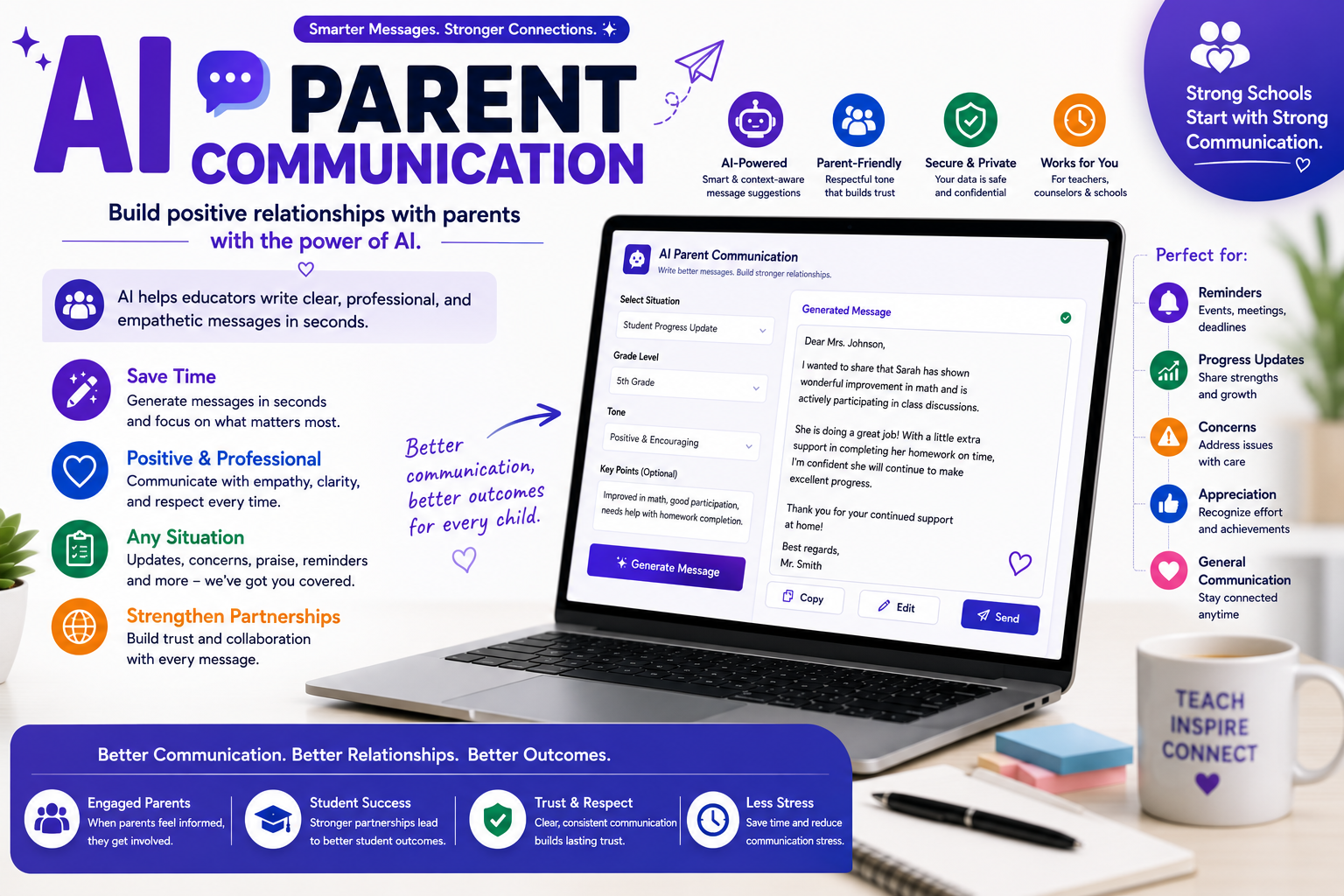
It’s 9:47 PM on a Tuesday. You’ve graded two stacks of essays, planned tomorrow’s lessons, and now you’re staring at a blank email draft to a parent who is upset about their child’s grade. You’ve rewritten the opening sentence four times. Sound familiar?
For millions of teachers, writing to families is one of the most emotionally draining parts of the job. It’s not teaching, it’s finding the right words, the right tone, and the right balance between honesty and diplomacy. This is exactly where AI parent communication tools have quietly become a game-changer in classrooms around the world.
In this guide, we’ll explore how artificial intelligence is reshaping the way educators connect with families, which tools are worth your time, and how to use them without losing the personal touch that makes teacher-family relationships work.
What Is AI Parent Communication?
At its core, AI parent communication refers to using artificial intelligence tools like ChatGPT, Claude, or education-specific platforms to help draft, translate, refine, and manage messages between schools and families. This includes everything from weekly newsletters and behavior updates to sensitive conversations about academic struggles.
The technology doesn’t replace the teacher’s voice. Instead, it acts like a thoughtful writing partner: you provide the situation and the key points, and the AI helps you shape them into a clear, professional message. Think of it as having an experienced colleague read over your shoulder, suggesting a softer phrase here or a clearer explanation there.
Why Teachers Are Turning to AI for Family Emails
1. Time Is the Scarcest Resource in Education
Research consistently shows teachers work far beyond contracted hours, and communication is a hidden time-sink. A single carefully worded email can take 20–30 minutes. Multiply that by a class of 25 students or 150 for secondary teachers and the math becomes overwhelming.
AI parent communication tools can cut drafting time from twenty minutes to three. That’s not laziness; that’s reclaiming your evening.
2. Emotional Labor Is Real
Writing a difficult message activates the same stress response as having the conversation face-to-face. When you use AI to produce a first draft, you create emotional distance from the hardest part—getting started. You can then edit with a clearer head, focusing on accuracy and warmth rather than wrestling with a blank page.
3. Language Barriers Disappear
Perhaps the most transformative benefit: AI can translate messages into dozens of languages while preserving tone. For schools serving multilingual communities, AI parent communication means every family receives updates; they can actually read a genuine equity win that was logistically impossible just a few years ago.
Popular Teacher Parent Communication Tools in 2026
The landscape of teacher parent communication tools has expanded rapidly. Here’s how the main categories break down:
General AI Assistants (ChatGPT, Claude, Gemini): Flexible and free or low-cost. You describe the situation, and the AI drafts a message. Writing ChatGPT parent emails has become so common that “help me email a parent” is now one of the most frequent teacher prompts. These tools excel at tone adjustment turning a frustrated brain-dump into a diplomatic, professional email for teachers to send with confidence.
Education-Specific Platforms (MagicSchool, Brisk, Diffit, Eduaide): Built for educators, these include pre-designed templates for report card comments, behavior notifications, and positive news updates. They understand school context out of the box, so you spend less time explaining the situation.
Communication Apps with AI Features (ClassDojo, TalkingPoints, Remind, ParentSquare): These platforms now embed AI translation and message suggestions directly into the tools schools already use, making adoption nearly frictionless.
The best choice depends on your workflow. Many teachers use a general AI assistant for tricky one-off messages and a platform like TalkingPoints for routine multilingual updates.
Parent Email Templates for Teachers: The AI Advantage
Traditional parent email templates for teachers have existed for decades photocopied sheets passed down through departments. The problem? They sound like templates. Parents can tell when they’ve received a form letter, and it subtly damages trust.
AI changes this equation. Instead of one rigid template, you can generate a personalized message in seconds. Here’s a practical workflow:
Step 1: Give context. “I need to email a parent about their 4th grader, Maya, who has been struggling with fractions but showed great improvement this week after extra practice.”
Step 2: Specify tone. “Warm and encouraging, about 100 words, ending with an invitation to reach out.”
Step 3: Edit for authenticity. Add a specific detail only you would know “Maya’s face lit up when she solved the word problem on Thursday.” That single sentence transforms an AI draft into a genuine human message.
This hybrid approach gives you the speed of parent email templates for teachers with the warmth of a handwritten note.
Handling Hard Conversations: Difficult Parent Email Examples
Every educator eventually faces the email they dread writing. Let’s look at how AI helps with difficult parent email examples across three common scenarios.
Scenario 1: The Grade Dispute
A parent emails angrily, claiming their child’s essay deserved an A, not a C+. Instead of responding defensively (or avoiding it for three days), you can ask AI to draft a reply that: acknowledges the parent’s concern, explains the rubric objectively, offers a meeting, and stays calm throughout. The AI won’t take the criticism personally which means the draft won’t sound defensive.
Scenario 2: The Behavior Notification
Telling a parent their child hit a classmate requires precision.Too harsh, and they feel their child is being labeled. AI parent communication tools are remarkably good at threading this needle, producing language that is factual, non-judgmental, and solution-focused: describing the behavior rather than characterizing the child.
Scenario 3: The Academic Concern
Raising the possibility that a student may need additional support is delicate territory. A well-prompted AI draft focuses on observations (“I’ve noticed Jamal needs the instructions repeated several times”) rather than conclusions, keeping the conversation collaborative instead of alarming.
In each case, the pattern is the same: AI handles the structure and diplomacy, and you supply the facts, judgment, and care.
Best Practices: Writing a Professional Email for Teachers with AI
Using AI well is a skill. These guidelines will keep your messages effective and ethical:
Never paste identifiable student information into public AI tools. Use first names only, or better, placeholders like “[Student].” Check your district’s data privacy policy and many now have explicit guidance on AI parent communication and student data.
Always edit before sending. AI occasionally produces phrasing that’s slightly off for your community or misses nuance. Read every draft as if the parent were sitting across from you.
Keep your voice. If you’d never say “I trust this correspondence finds you well,” delete it. The goal of any professional email for teachers is clarity and warmth, not corporate polish.
Lead with positives regularly. One of the smartest uses of AI is scaling good news. Sending five quick positive notes a week, something few teachers have time to do manually builds a reservoir of goodwill that makes difficult conversations easier later.
Be transparent when appropriate. Some schools now include a note that AI tools assist with translation. Most parents appreciate the effort to communicate in their language, however it happens.
The Human Element: What AI Can’t Do
Let’s be honest about limitations. AI parent communication tools can’t attend a parent-teacher conference, notice the worry in a mother’s voice, or know that a family just went through a divorce. They can’t build trust; only consistent, caring human interaction does that.
The teachers getting the best results treat AI as an amplifier, not a replacement. The technology handles the mechanical burden of writing so that teachers have more energy for the relational work that actually matters: the phone call, the hallway conversation, the moment of genuine connection at pickup time.
There’s also a real risk of over-automation. If every message a family receives sounds polished but generic, communication becomes noise. Use AI to communicate better, not just more.
Getting Started This Week
You don’t need a district initiative to begin. Try this:
- Pick one routine message you often send a weekly update or homework reminder and draft it with a free AI tool.
- For your next tricky email, write your honest, unfiltered version first, then ask AI to “make this professional and constructive.”
- Set a goal of three AI-assisted positive notes to families this week.
Within a month, most teachers report that AI parent communication has shifted from novelty to necessity not because it replaced their judgment, but because it gave them back time and reduced the dread factor of their inbox.
Final Thoughts
The heart of teaching has always been relationships, and relationships run on communication. For too long, the sheer volume of that communication has drained the educators best positioned to build those bonds. AI parent communication doesn’t change what great teachers say to families; it removes the friction standing between the thought and the send button.
Used wisely, it means clearer messages, faster responses, fewer language barriers, and most importantly teachers with enough energy left at 9:47 PM to close the laptop and rest. And a well-rested teacher is the best family engagement tool ever invented.
Related guides
AI-assisted report card comments · Weekly AI teaching workflow · Classroom management prompts
Further reading: U.S. Department of Education: student privacy guidance.