
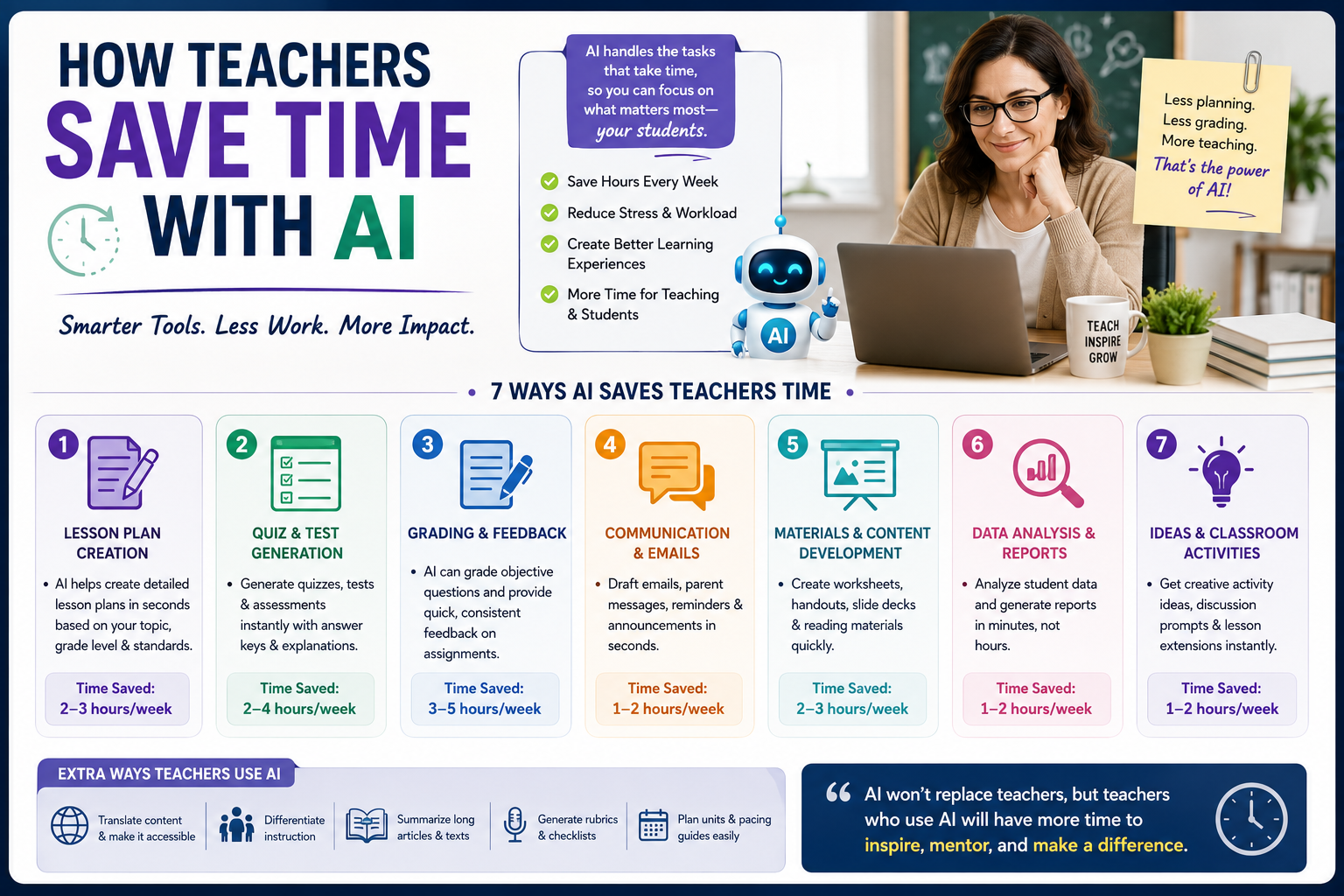
If you ask any educator what they need most, the answer is almost never “more resources” or “better technology.” It’s time. Between lesson planning, grading stacks of assignments, writing report card comments, answering parent emails, and attending meetings, the average teacher works far beyond contracted hours every single week. That’s exactly why understanding how teachers save time with AI has become one of the most searched topics in education today.
The good news? Artificial intelligence has quietly matured from a buzzword into a practical assistant that handles the repetitive, draining parts of teaching so educators can focus on what actually matters: their students. In this guide, we’ll break down exactly how teachers save time with AI, which tasks to automate first, and how to do it responsibly.
Why Teachers Are Turning to AI in the First Place
Let’s be honest about the problem. Teaching has always been demanding, but the administrative load has grown heavier every year. Studies consistently show that teachers spend less than half of their working hours actually teaching. The rest disappears into paperwork, planning, grading, and communication.
This imbalance is the root cause of teacher burnout, and it’s why so many talented educators leave the profession within their first five years. Traditional teacher burnout solutions mindfulness apps, wellness workshops, “self-care Sundays”treat the symptoms, not the disease. The disease is workload. And this is where learning how teachers save time with AI changes the conversation entirely, because AI doesn’t just help you cope with the workload. It shrinks it.
1. Save Time Grading with AI Feedback Tools
Grading is the single biggest time thief in a teacher’s week. A stack of 90 essays can easily consume an entire weekend. AI now offers a realistic way to save time grading without sacrificing feedback quality.
Here’s how it works in practice:
- First-pass feedback: AI tools can scan student writing and flag grammar issues, structural weaknesses, and missing thesis statements before you ever pick up a red pen.
- Rubric-based scoring: Upload your rubric, and AI can suggest preliminary scores with justifications. You stay in control of the final grade, but the heavy lifting is done.
- Personalized comments: Instead of writing “Great effort, but work on transitions” for the fortieth time, AI drafts individualized comments based on each student’s actual work, which you can quickly review and edit.
Teachers who adopt this workflow consistently report cutting grading time by 40–60%. That’s not a marginal improvement that’s your Sunday back. If you’re wondering how teachers save time with AI in the most measurable way, grading is where the numbers speak loudest.
Important caveat: AI should assist grading, not replace your judgment. Always review AI-generated feedback before it reaches students, and never feed identifiable student data into tools that haven’t been approved by your school.
2. Lesson Planning in Minutes, Not Hours
A single well-differentiated lesson plan can take 1–3 hours to build from scratch. Multiply that across five classes and a full week, and planning alone becomes a part-time job.
AI automation for teachers shines here. With a clear prompt grade level, subject, learning objective, class duration, and student needs AI can generate:
- A complete lesson structure with warm-ups, direct instruction, guided practice, and exit tickets
- Differentiated versions for advanced learners, struggling students, and English language learners
- Discussion questions at varying levels of Bloom’s taxonomy
- Extension activities and homework options
The key is treating AI output as a first draft, not a final product. You bring the pedagogical expertise and knowledge of your students; AI brings the speed. A plan that took two hours now takes twenty minutes of prompting, reviewing, and refining. This is how teachers save time with AI without compromising instructional quality the human stays in the driver’s seat while the machine handles the scaffolding.
3. Automate Parent Communication and Emails
Few things drain a teacher’s evening like composing a delicate email to a concerned parent. You want to be honest, professional, warm, and diplomatic all at 9 p.m. after a full day of teaching.
AI drafting tools handle this beautifully. Describe the situation (“Student has missed four homework assignments, parent is anxious, I want to be encouraging but clear”), and AI produces a polished draft in seconds. You personalize it, hit send, and move on with your life.
The same applies to:
- Weekly classroom newsletters
- Permission slips and event announcements
- Behavior documentation
- Report card comments (drafted in bulk, then individualized)
These small wins compound. Fifteen minutes saved per email, across dozens of communications per month, adds up to hours reclaimed and a genuine improvement in teacher work-life balance.
4. Create Differentiated Materials Instantly
Differentiation is one of teaching’s most valuable practices and one of its most time-expensive. Creating three versions of the same worksheet used to mean three times the work.
Not anymore. Among modern teacher productivity tools, AI is uniquely good at transformation tasks:
- Reading level adjustment: Paste a passage and ask for versions at three different Lexile levels.
- Question generation: Turn any text into comprehension questions, quizzes, or discussion prompts in seconds.
- Format conversion: Transform lecture notes into study guides, flashcards, graphic organizers, or slide outlines.
- Translation support: Generate parent letters or student instructions in multiple languages for multilingual classrooms.
This is one of the clearest examples of how teachers save time with AI while actually improving instruction because when differentiation takes minutes instead of hours, teachers actually do it more often, and students benefit directly.
5. Streamline Administrative Tasks and Documentation
Beyond the classroom, teachers drown in administrative work: IEP documentation support, meeting notes, curriculum mapping, data analysis, and accreditation paperwork. AI automation for teachers extends into all of it:
- Meeting summaries: Record (with permission) or paste your notes, and AI produces clean, organized summaries with action items.
- Data interpretation: Paste anonymized assessment data and ask AI to identify trends, struggling skill areas, or grouping suggestions.
- Template creation: Build reusable templates for behavior logs, intervention tracking, and progress reports once, then let AI populate variations.
- Offloading them is not cutting corners it’s reallocating professional energy toward students. That reallocation is the heart of any serious effort to reduce teacher workload.
6. Build a Sustainable AI Workflow (Not Just a Toolbox)
Here’s where many educators go wrong: they collect a dozen teacher productivity tools, use each once, and abandon them. The teachers who genuinely transform their workload do something different they build a workflow.
A simple, sustainable weekly AI workflow looks like this:
- Sunday (20 min): Generate and refine the week’s lesson plan drafts.
- Daily (10 min): Draft parent emails and communications as they arise.
- Wednesday (30 min): Run first-pass AI feedback on collected assignments to save time grading before your detailed review.
- Friday (15 min): Summarize the week’s notes, update documentation, and prep materials for Monday.
Total: under two hours of AI-assisted work replacing what used to take eight to ten. When people ask how teachers save time with AI in a way that lasts, the answer is consistency a small set of tools used routinely beats a large set used sporadically.
7. Protect Your Boundaries AI as a Burnout Solution
Let’s return to the bigger picture. The most meaningful teacher burnout solutions are structural, and reclaiming 6–10 hours per week is structural change. Teachers using AI intentionally report:
- Leaving school at contract time more often
- Actually taking weekends off
- Having energy left for creative teaching rather than survival teaching
- Reduced Sunday-night dread
That’s real teacher work-life balance not a bubble bath, but a genuinely lighter load. The technology isn’t magic; it’s leverage. And leverage is exactly what an overworked profession needs.
Responsible Use: The Non-Negotiables
Before you dive in, keep these guardrails in place:
- Student privacy first. Never input names, IDs, or identifiable data into consumer AI tools. Use school-approved platforms and anonymize everything else.
- You are the professional. AI drafts; you decide. Every plan, grade, and email should pass through your judgment.
- Follow district policy. AI guidelines vary widely between schools know yours.
- Model integrity. If you expect students to use AI ethically, demonstrate what that looks like.
Final Thoughts
The question is no longer whether AI belongs in education it’s whether teachers will use it to reclaim their time or continue burning out under a workload no human should carry alone. Understanding how teachers save time with AI isn’t about replacing the art of teaching.Start small: pick one task this week grading feedback, a lesson plan, or that email you’ve been dreading and let AI handle the first draft. Measure the time you save. Then build from there. Your students need you present, energized, and creative. AI can’t do that part.
Related guides
Weekly AI teaching workflow · Create lesson plans with AI · AI-assisted essay grading
Further reading: U.S. Department of Education: student privacy guidance.